Creator business
Get Paid to Video Call Fans by the Minute
A practical playbook for turning audience trust into paid live conversations without building another endless content schedule.
You can get paid to video call fans without adding another daily posting quota to your life. The basic model is direct: set a per-minute rate, choose when you are available, and earn when a fan connects for a live one-on-one conversation.
The platform handles the call and payment flow. Your job is to create a reason to call, set boundaries, and make the live window feel worth showing up for.
We rechecked BuzzStar’s recording details against its App Store listing on September 22, 2026. The other sources in this guide retain their August 5 review dates.
How paid fan video calls work
On BuzzStar’s creator program, creators set a per-minute rate and choose when they go online. Fans can see the rate before a call, select a call length, and get notified when a creator becomes available.
BuzzStar supports paid time extensions where offered. Fans can purchase a recording when it is available and both participants agree. Explore the current creator features, including paid messages and personal replies, for other ways to connect with fans.
For a live-call session:
- You create and verify a creator profile.
- You set a rate and decide when to go live.
- You announce the live window to your audience.
- A fan connects through the platform and pays for the call.
- You complete the conversation and review what drove demand.
This keeps payment and the call in one place. It also avoids sending a personal phone number, chasing an invoice, or asking a fan to trust an unfamiliar payment link.
Share the first-call guide with fans who are new to BuzzStar. It explains signup, checkout, the queue, and joining a call.
Who should offer paid fan calls?
Follower count is a weak first test. Repeated questions and active replies are better signs of demand.
Paid calls can fit creators whose audiences already ask for:
- Personal advice based on the creator’s real experience
- A reaction, pep talk, or quick opinion
- Feedback on a song, outfit, routine, pitch, or piece of content
- A live birthday or celebration moment
- Behind-the-scenes context about public work
- A chance to talk without fighting a fast public chat
You still need to stay inside your qualifications. A fitness creator can discuss their own routine but should not present a call as medical care. A business creator can share experience but should not promise a financial result.
Browse the BuzzStar creator directory and notice how different creator categories can support different conversations. The offer should sound like you, not like a generic consultation template.
Set a per-minute rate without guessing
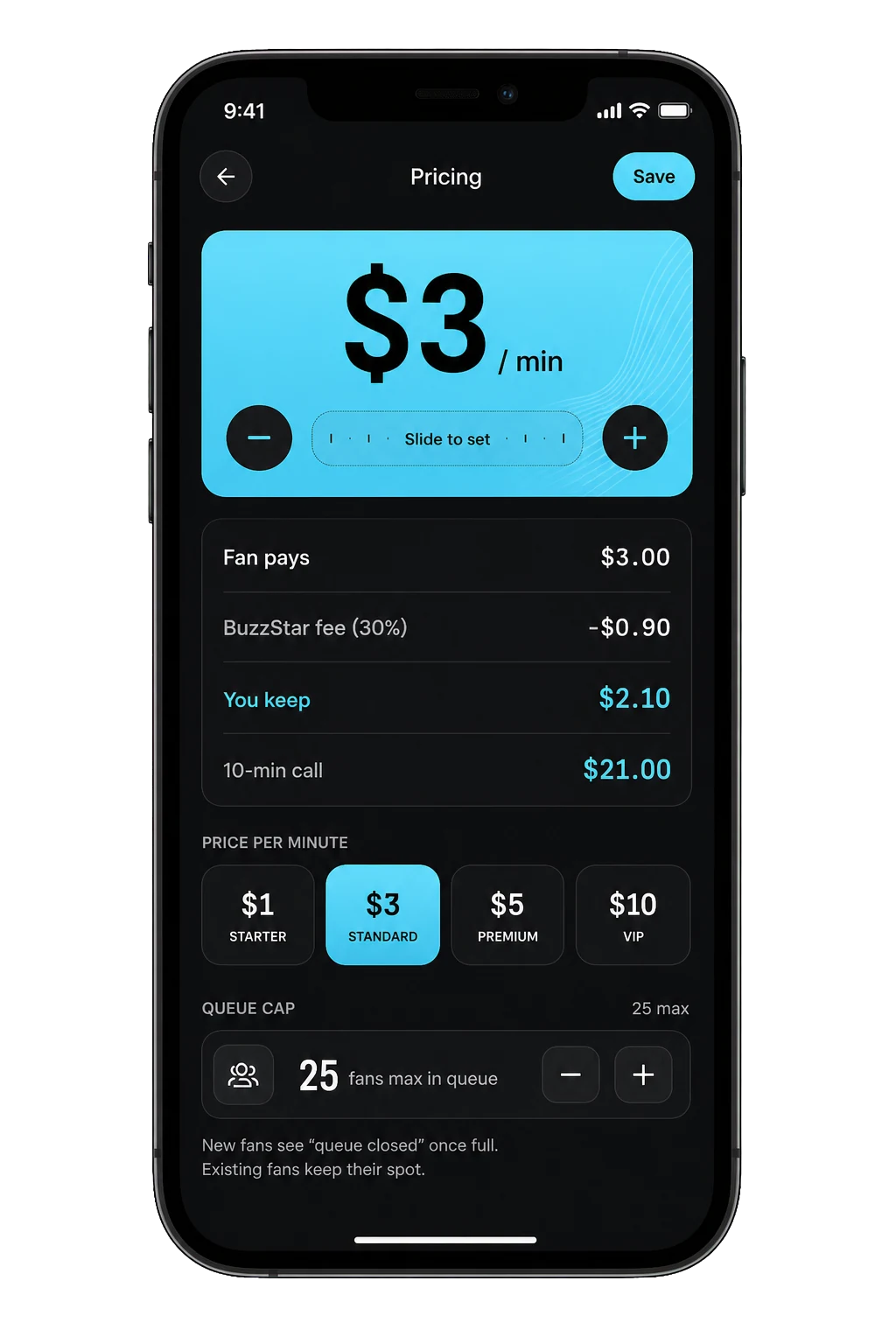
There is no universal correct rate. Your best starting price depends on audience demand, how much time you can offer, what fans receive, and how focused the call is.
Use a simple capacity model:
Estimated gross session value = displayed per-minute rate × paid minutes
That is a planning formula, not a promise. Your completed calls, platform terms, payment adjustments, taxes, and actual demand determine what you take home.
The BuzzStar pricing guide explains live-call rates and separate prices for extensions, scheduled calls, messages, and replies.
Start with a small test:
- Pick one 20 to 30 minute live window.
- Choose a rate that makes the time worthwhile even with one call.
- Announce one clear reason to call.
- Track views, profile visits, call requests, completed minutes, and repeat callers.
- Adjust one variable for the next window.
Do not lower the rate after five quiet minutes. Your audience may not have seen the announcement yet, and constant changes train people to wait.
Give fans a reason to call now
“I am live” is an announcement, not an offer. Tell fans what the time is for.
Strong call themes are specific:
- I will review your 30-second music hook live for the next 25 minutes.
- Bring me one confidence question before your first day at a new school.
- Show me two outfit choices and I will help you pick one.
- Ask me what I learned from my last project.
- Birthday calls are open until 8 p.m.
Specific themes reduce awkward openings and help fans decide whether the price fits the value. They also give you something honest to promote without pretending everyone will get the same result.
Link to the call from the social platform where your most engaged followers already respond. One clear post, one Story reminder, and one live mention can work better than repeating the same sales line all day.
Design a call people remember
You do not need a script, but you do need a shape.
Open by using the fan’s name and asking what would make the call useful or fun. Listen before jumping into your standard story. Close by summarizing the best moment or thanking them for the specific thing they shared.
A simple three-part call looks like this:
- Set the direction. Ask what they want to talk about.
- Create the moment. Answer, react, demonstrate, or celebrate.
- Land the call. Give a clear final thought before time runs out.
Discuss a recording only if it is offered and both participants agree. Explain that it is a separate purchase. Do not force every conversation into an upsell.
Protect your time and boundaries
Direct access works only when the rules are clear. Decide your limits before the first call, not while a fan is testing them.
Your operating rules should cover:
- Topics you will not discuss
- Personal information you will never share
- Whether other people may appear on either side of the call
- What causes you to end a call
- Whether recordings are available
- When you will be online and how long you will stay
Keep calls on the platform. Do not give out a personal number, private account, home address, or live location. If a caller becomes abusive, threatening, sexual, or invasive, end the interaction and use the platform’s reporting tools.
BuzzStar is available to users age 13 and older, so creator interactions must stay appropriate for that audience. Your own content category does not override the platform rules.
Treat it like a creator business
Track a small set of numbers after every live window:
- Announcements posted
- Profile visits
- Call requests
- Completed calls
- Paid minutes
- Repeat callers
- Common conversation themes
This tells you whether the problem is reach, offer clarity, conversion, or retention. If people visit but do not call, your rate or offer may be unclear. If calls happen but nobody returns, improve the experience before adding more promotion.
Keep clean records. The IRS says U.S. gig-economy income is taxable even when the work is part-time or no information return reports it. Save payout records and business expenses, and ask a qualified tax professional about your situation.
If you promote a product or brand during a paid call or in the posts that sell it, follow disclosure rules. The FTC says creators must clearly disclose a material relationship with a brand in a place people will notice.
A seven-day launch plan
Day 1: Define one call theme and three boundaries.
Day 2: Set up your profile, photo, bio, rate, and availability.
Day 3: Ask your audience which two call themes they value more.
Day 4: Announce the winning theme and the exact live window.
Day 5: Go live, complete calls, and write down the questions people ask.
Day 6: Review the numbers and choose one change.
Day 7: Schedule the next window and share one honest takeaway without exposing a fan’s private details.
The goal of the first week is not a viral earnings screenshot. It is proof that your audience understands the offer and that you can deliver a conversation worth repeating.
When you are ready, apply to become a BuzzStar creator. You set the rate and the schedule. The part fans pay for is still the most human one: your time and attention.
Straight answers
Frequently asked questions
Can I get paid to video call my fans?
Yes. Platforms such as BuzzStar let approved creators set a per-minute rate and earn from live one-on-one fan calls. The important work is not only turning on a price. You also need clear availability, a reason for fans to call, strong boundaries, and a repeatable way to announce when you are online.
How much should I charge for fan video calls?
Start with a rate that matches your audience demand, the value of your time, and the type of conversation you offer. Test a short live window and review completed calls instead of copying another creator's number. Your displayed rate should be clear before the call, and you should raise it only when demand consistently exceeds your available time.
Do I need a large following to sell live calls?
A large audience can help, but intent matters more than a raw follower count. A smaller group that regularly asks for advice, feedback, reactions, or personal conversation may create stronger demand than a large passive audience. Start with the followers who already reply, join lives, or ask questions you can answer well.
Is income from paid fan calls taxable?
In the United States, the IRS says gig-economy income is taxable even when it is part-time or not shown on an information return. Keep records of earnings and business expenses, and get advice that fits your location and business structure. BuzzStar does not provide tax or legal advice.
Evidence desk
Sources
- BuzzStar creator programBuzzStar · checked Aug 5, 2026
- BuzzStar App Store listingApple App Store · checked Sep 22, 2026
- Gig Economy Tax CenterInternal Revenue Service · checked Aug 5, 2026
- Disclosures 101 for Social Media InfluencersFederal Trade Commission · checked Aug 5, 2026
Published August 5, 2026. Last updated September 22, 2026. Features, prices, and availability can change, so confirm current details in the relevant app before paying.
Make the next scroll a conversation.